
- Home
- Cloud PBX
With Cloud PBX, never miss a call
An enterprise phone system without boxes or cabling. Calls reach the right person, every conversation is recorded and managers see everything live.
- No PBX hardware, installation or maintenance costs
- Port your number; same number in the office, at home, on mobile
- IVR, smart queues, call recording and reports included
- WhatsApp and phone on the same team screen
What is your old PBX costing you?
Every missed call may be a lost customer. An old PBX, a separate WhatsApp phone and a disconnected CRM scatter data, hide team performance and inflate costs.
| Topic | Traditional PBX | Nitelix Cloud PBX |
|---|---|---|
| Upfront cost | PBX box, cards, cabling | No hardware investment |
| Maintenance | Technician visits, part replacement | We run and monitor it 24/7 |
| Remote work | No extension outside the office | Same extension on mobile, desktop, browser |
| Call recording | Extra device/license required | Included, encrypted archive |
| Reporting | Limited or none | Live dashboard, CDR, agent performance |
| Scaling | New hardware when capacity runs out | New extensions in minutes from the panel |
| On a separate phone, untracked | Same panel, managed by the team | |
| Branches | Separate PBX per branch | All branches on one PBX, free internal calls |
Every call to the right person, at the right time
Dynamic routing by number, time, caller and customer data. Customers reach the right person the first time.
Everything you expect from an enterprise PBX
No chasing extra licenses — modules managed from one panel that grow with your needs. Building a contact center? Look here →
IVR
Multi-level, multilingual voice menus and custom announcements.
Time-based routing
Business hours, after-hours and holidays switch automatically.
Smart queues
Fair distribution by availability, skills and priority.
Call recording
All inbound, outbound and internal calls in an encrypted archive.
Live monitoring & coaching
Supervisors listen in and whisper to agents.
Reports & CDR
Detailed reports by duration, missed calls, department and agent.
Transfer & BLF
Blind/attended transfer, busy lamps, shared directory, short codes.
Call pickup groups
Answer a ringing colleague's phone with one key.
Multiple trunks & failover
Multiple carriers, redundant routes, least-cost routing.
Auto-dialer
Parallel outbound calls from an Excel list; answered calls go to a queue or menu.
Satisfaction survey
Post-call keypad survey with automatic scoring.
Number masking
Role-based masking, controlled access and audit trail.
Your PBX goes wherever your team works
A desk phone in the office, a computer at home, a mobile in the field — same extension, same number, same recording and reporting.
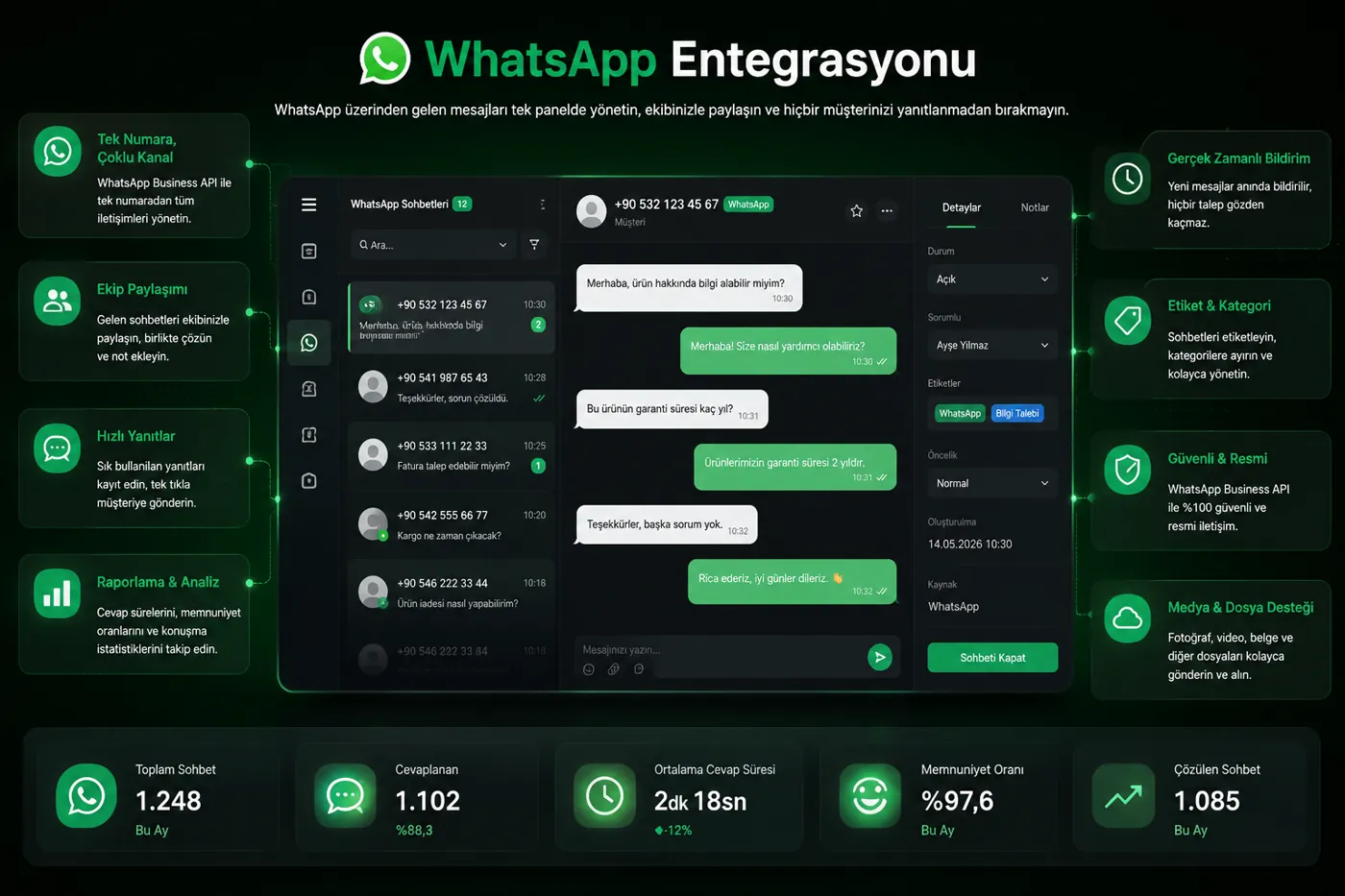
WhatsApp, Instagram and phone in one team inbox
With the official WhatsApp Business API, messages no longer get lost on a single phone. The team replies from a shared inbox, ownership is clear and history builds up on one customer card.
Know which ad brought which call
Leads from Meta, Google, TikTok and LinkedIn ads land in the system instantly, are greeted via WhatsApp and phone, and conversion is measured end to end.
Ads & leads
Campaigns on 4 platforms; forms and DMs automatically become customer records.
Instant contact
WhatsApp welcome message and a call to an agent; hot leads are reached before they cool down.
Measurement & ROI
Orders, bookings and call outcomes are tied to the ad source; real return becomes visible.
Human time is precious — let AI handle the rest
AI runs inside the PBX and WhatsApp — no separate product to install.
Speech to text
Calls become searchable text.
Auto summary
Notes and next steps after each call.
Smart replies
Answers common questions, hands off complex ones.
Booking assistant
Books and reminds via WhatsApp 24/7.
Talks to the systems you already use
Connects to your CRM, ERP, e-commerce and workflow tools via open REST API and event-driven webhooks.
Encrypted transport
SIP-TLS, SRTP, WSS and HTTPS everywhere.
Fraud protection
IP allow/deny lists and rate limiting block SIP attacks instantly.
Multi-tenant isolation
Each company's data is isolated; permissions are role-based.
Cloud PBX — frequently asked questions
What do I need for a cloud PBX?
Only an internet connection with suitable capacity. Extensions work on IP phones, desktop softphones, the browser (WebRTC) or iOS/Android apps; no PBX box is installed in your office.
Can I keep my current phone number?
Yes. You can port landline and 0850 numbers and add as many new numbers as you like. Multiple carrier lines (SIP trunks) can be used redundantly on the same PBX.
Which IP phones are supported?
It works with SIP phones, especially Yealink, Grandstream and Gigaset. Supported models configure themselves via auto-provisioning — no manual setup per device.
Can staff call from home or mobile with the company number?
Yes. With the iOS/Android softphone, Windows desktop app or browser, an extension works exactly as in the office; callers always see your company number.
How long are call recordings kept?
Retention is set according to your needs and regulations. Recordings are kept in an encrypted archive, authorized users can listen and download them from the panel, and number masking protects sensitive data.
How is cloud PBX pricing determined?
Pricing depends on the number of extensions, numbers/lines, call recording and selected modules (WhatsApp, auto-dialer, AI, etc.). With no hardware investment or maintenance fees, total cost is significantly lower than a traditional PBX. Request a tailored quote via the form.
What happens if the internet goes down?
The PBX keeps running in the data center. With a failover scenario, incoming calls are automatically forwarded to mobile phones, another branch or voicemail — no call is lost.
Can WhatsApp calls be connected to the PBX?
Yes. With WhatsApp Business Calling integration, voice calls from WhatsApp enter your IVR and queues like normal calls and are recorded and reported. This feature is offered under Meta's beta program.
See your new PBX live in 30 minutes
A free demo prepared with your numbers, team and scenarios. No commitment, with a 14-day pilot option.